The post Projector Screen Gain Explained: How to Choose the Right Gain first appeared on Cynthia Screen | Professional Projection Screen Manufacturer.
]]>Projector Screen Gain – When selecting a projector screen, many users focus on screen size, projector brightness, and screen material, but one important specification is often misunderstood:
Screen Gain
Projector screen gain affects how bright the projected image appears, but it is not the only factor that determines image quality.
A professional projection screen is a combination of multiple optical characteristics, including:
- Reflection efficiency
- Light direction control
- Ambient light rejection
- Viewing angle
- Brightness uniformity
- Contrast performance
Therefore, choosing the right gain is not simply about selecting the highest number.
The ideal screen depends on:
- Projector type
- Room environment
- Screen size
- Seating arrangement
- Desired viewing experience
What Is Projector Screen Gain?
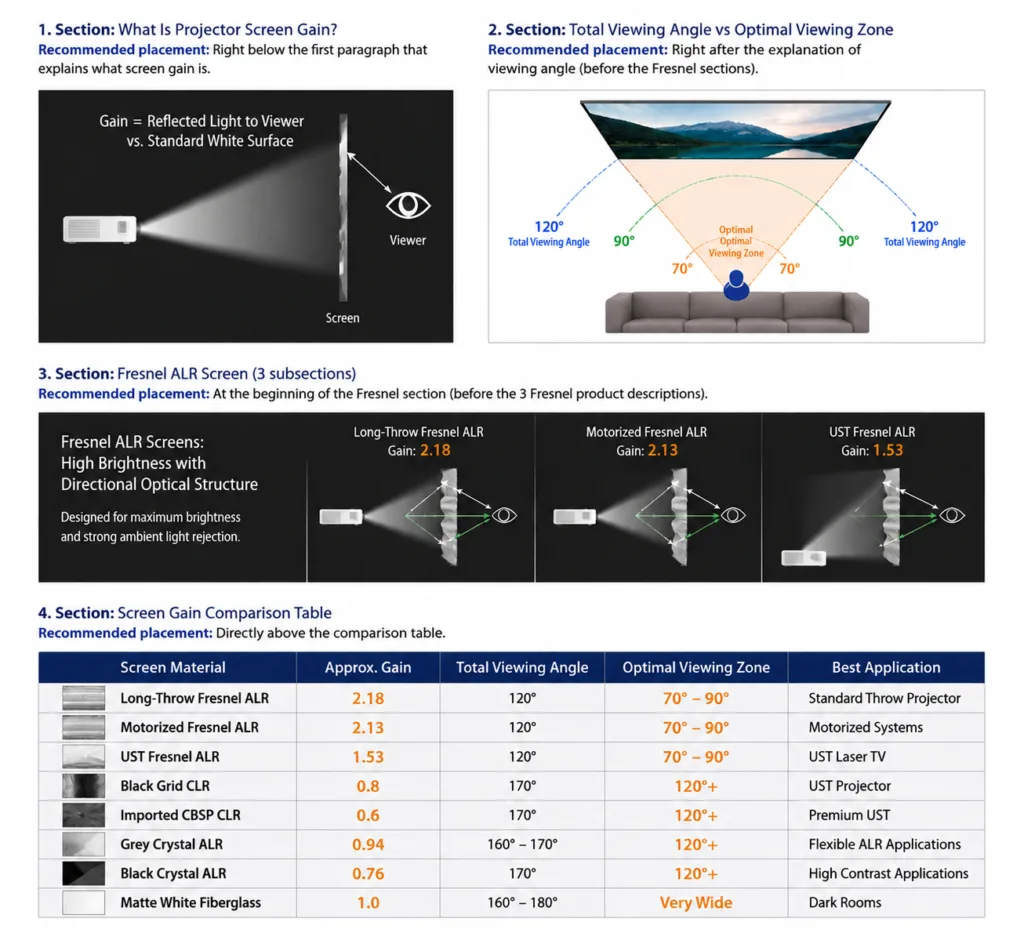
Projector screen gain is a measurement of how much light a screen reflects compared with a standard reference surface.
A standard matte white projection screen is generally considered:
Gain: 1.0
A screen with:
- Gain above 1.0 reflects more light toward viewers.
- Gain below 1.0 reflects less light but may provide better uniformity, contrast characteristics, or wider viewing flexibility.
However, gain does not work independently.
For example:
A Fresnel ALR screen with high gain uses a directional optical structure to concentrate projector light toward viewers.
A Black Grid CLR screen with lower gain uses a different optical structure to achieve wide viewing angles and ambient light rejection.
Both can provide excellent image quality, but for different applications.
Does Higher Gain Mean Better Projection Performance?
Not necessarily.
A higher gain screen can provide:
- Higher perceived brightness
- Better performance for large screen sizes
- Improved visibility in bright environments
However, higher gain may also require more careful consideration of:
- Viewing position
- Screen uniformity
- Optical characteristics
The best screen is not the one with the highest gain, but the one that provides the best balance between:
- Brightness
- Contrast
- Viewing angle
- Room compatibility
Understanding Gain and Viewing Angle
Gain and viewing angle are closely related, but the relationship depends on the screen technology.
A common misunderstanding is:
Higher gain always means a very narrow viewing angle.
This is not always accurate.
Different optical structures achieve different balances between gain and viewing angle.
Total Viewing Angle vs Optimal Viewing Zone
Many projection screens specify a total viewing angle, but this does not mean the entire angle range provides identical image quality.
For example:
Salvers & Stands may be specified with:
Total Viewing Angle: Approx. 120°
However, the best image performance is usually achieved within a smaller area:
Optimal Viewing Zone: Approx. 70°–90°
Within this optimal zone, viewers can experience:
- Better brightness uniformity
- Higher contrast
- More stable color performance
- Reduced hotspot perception
Outside this area, brightness and contrast may gradually decrease.
This characteristic is related to the highly directional optical structure of Fresnel screens.
Fresnel ALR Screen Gain Explained
Fresnel ALR screens use a precision optical structure designed to control light direction.
They are especially popular for:
- UST laser TV systems
- Bright living rooms
- Premium home theaters
Long-Throw Fresnel ALR Screen
Typical specifications:
- Peak Gain: Approx. 2.18
- Total Viewing Angle: Approx. 120°
- Recommended Optimal Viewing Zone: Approx. 70°–90°
Advantages:
- Very high perceived brightness
- Strong ambient light rejection
- Excellent contrast performance
Best for:
- Standard throw projectors
- High brightness requirements
- Large screen applications
Motorized Long-Throw Fresnel ALR Screen
Typical specifications:
- Peak Gain: Approx. 2.13
- Total Viewing Angle: Approx. 120°
- Recommended Optimal Viewing Zone: Approx. 70°–90°
Designed for:
- Motorized floor rising screens
- Ceiling recessed screens
- Premium automated installations
UST Fresnel ALR Screen
Typical specifications:
- Peak Gain: Approx. 1.53
- Total Viewing Angle: Approx. 120°
- Recommended Optimal Viewing Zone: Approx. 70°–90°
Designed specifically for:
- Ultra short throw projectors
- Laser TV systems
Advantages:
- High contrast
- Strong ambient light rejection
- Improved daytime viewing performance
Storage & Peripherals Gain Explained
Black Grid CLR screens use a different optical structure from Fresnel screens.
They are designed mainly for UST projectors.
Typical specifications:
- Gain: Approx. 0.8
- Viewing Angle: Approx. 170°
Advantages:
- Wide viewing angle
- Strong ceiling light rejection
- Good contrast performance
Compared with Fresnel screens, Black Grid CLR screens usually provide more flexibility for family viewing environments with multiple seating positions.
Imported CBSP CLR Screen
Premium CBSP CLR materials typically provide:
- Gain: Approx. 0.6
- Viewing Angle: Approx. 170°
Advantages:
- Higher contrast performance
- Wide viewing flexibility
- Premium UST projector compatibility
Suitable for:
- High-end laser TV systems
- Professional UST installations
Grey Crystal ALR Screen Gain Explained
Grey Crystal screens are designed to provide a balance between brightness, contrast, and viewing flexibility.
Typical specifications:
- Gain: Approx. 0.94
- Viewing Angle: Approx. 160°–170°
Advantages:
- Balanced brightness
- Improved black level perception
- Wide viewing angle
- Good compatibility with different projector types
Grey Crystal is especially suitable for users who want:
- Better contrast than matte white screens
- More flexibility than highly directional optical screens
Black Crystal ALR Screen
Typical specifications:
- Gain: Approx. 0.76
- Viewing Angle: Approx. 170°
Advantages:
- Higher contrast
- Strong ambient light performance
- Wide viewing flexibility
Suitable for:
- Living rooms
- Long throw projectors
- Users prioritizing deeper blacks
Matte White Screen Gain
Matte white screens are the traditional projection solution.
Typical specifications:
- Gain: Approx. 1.0
- Viewing Angle: Approx. 160°–180°
Advantages:
- Natural image reproduction
- Very wide viewing angle
- Good brightness uniformity
Limitations:
- No ambient light rejection
- Lower contrast in bright rooms
Best for:
- Dedicated dark rooms
- Controlled lighting environments
Screen Gain Comparison Table
| Screen Material | Approx. Gain | Viewing Angle | Best Application |
|---|---|---|---|
| Long-Throw Fresnel ALR | 2.18 | 120° Total / 70°–90° Optimal | Standard Throw Projector |
| Motorized Fresnel ALR | 2.13 | 120° Total / 70°–90° Optimal | Motorized Systems |
| UST Fresnel ALR | 1.53 | 120° Total / 70°–90° Optimal | UST Laser TV |
| Black Grid CLR | 0.8 | Approx. 170° | UST Projector |
| Imported CBSP CLR | 0.6 | Approx. 170° | Premium UST |
| Grey Crystal ALR | 0.94 | Approx. 160°–170° | Flexible ALR Applications |
| Black Crystal ALR | 0.76 | Approx. 170° | High Contrast Applications |
| Matte White Fiberglass | 1.0 | Approx. 160°–180° | Dark Rooms |
How to Choose the Right Screen Gain?
Bright Living Room
Recommended:
- Fresnel ALR
- CLR / Black Grid
- Grey Crystal
Consider:
- Ambient light level
- Seating arrangement
- Desired contrast
UST Projector Setup
Recommended:
- UST Fresnel ALR
- Black Grid CLR
- CBSP CLR
UST projectors require dedicated optical screen structures because of their steep projection angle.
Dedicated Home Theater
Recommended:
- Matte White
- Grey Crystal
- Fixed Frame ALR
A wider viewing angle and natural image appearance may be more important than maximum brightness.
Common Mistakes When Choosing Screen Gain
Choosing the Highest Gain
Higher gain does not automatically mean better image quality.
The entire optical design matters.
Ignoring Viewing Position
A highly directional screen may not be ideal for large seating areas.
Comparing Gain Numbers Between Different Technologies
A 1.5 gain Fresnel screen and a 1.5 gain traditional screen may perform very differently.
Gain must always be evaluated together with:
- Optical structure
- Viewing angle
- ALR performance
Final Thoughts
Projector screen gain is an important specification, but it should always be considered together with the complete screen design.
The best screen depends on:
- Projector type
- Room lighting
- Screen size
- Seating arrangement
- Viewing expectations
At mayoga, different optical screen technologies are developed for different applications:
- Fresnel ALR screens for high brightness and strong directional light control
- CLR / Black Grid screens for wide-angle UST viewing
- Grey Crystal screens for balanced performance
- Matte White screens for natural image reproduction
Understanding projector screen gain helps you choose the right screen and achieve the best possible viewing experience.
FAQs
Is a higher gain projector screen always better?
No. Higher gain increases perceived brightness but does not always provide better overall image quality.
What is the best gain for a UST projector?
UST projectors require dedicated UST screens. The ideal gain depends on the optical design and room environment.
Why does Fresnel screen have a narrower optimal viewing area?
Because Fresnel screens use directional optical structures to maximize brightness and ambient light rejection.
Is viewing angle the same as best viewing angle?
No. Total viewing angle shows the maximum acceptable range, while optimal viewing zone represents the area with the best brightness and image consistency.
What gain is best for a home theater?
The best gain depends on projector brightness, room lighting, and seating arrangement.
Professional Projection Screen Solutions
mayoga provides professional projection screen solutions for:
- Home Theater
- Laser TV
- Commercial AV Systems
- Education Applications
Our products include:
- Fresnel ALR Screens
- UST ALR Screens
- CLR / Black Grid Screens
- Grey Crystal ALR Screens
- Fixed Frame Screens
- Motorized Projection Screens
Visit:
www.mayoga.it
Contact us for OME options and prices:
Follow us on facebook:
https://www.facebook.com/cprojectionscreen/#
Subscribe our youtube:
The post Projector Screen Gain Explained: How to Choose the Right Gain first appeared on Cynthia Screen | Professional Projection Screen Manufacturer.
]]>The post How to Reduce Laser Speckle on Projector Screens first appeared on Cynthia Screen | Professional Projection Screen Manufacturer.
]]>Reduce Laser Speckle
Reduce Laser Speckle – RGB triple laser projectors have become increasingly popular thanks to their exceptional brightness, wide color gamut, and outstanding color accuracy. They can deliver a stunning cinematic experience, especially when paired with a high-quality projection screen.
However, some users notice a shimmering or grainy texture on the projected image, commonly known as laser speckle.
Although laser speckle is a normal optical phenomenon rather than a product defect, many users want to know how to reduce its visibility.
In this guide, we’ll explain practical ways to minimize laser speckle and help you achieve a smoother viewing experience.
What Causes Laser Speckle?
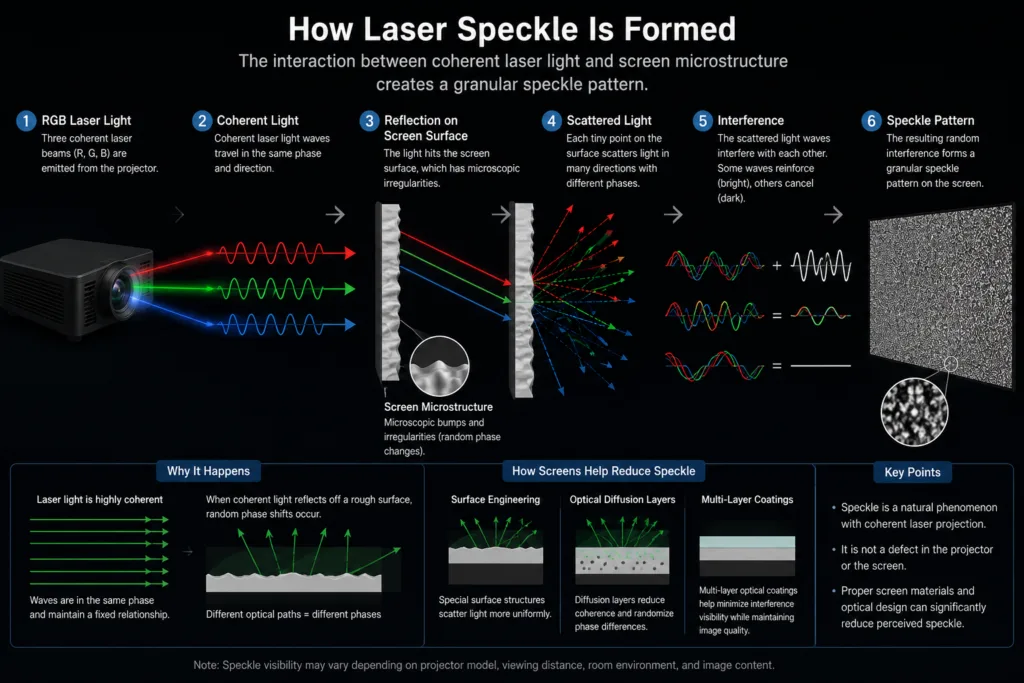
Laser speckle occurs because laser light is highly coherent.
When coherent laser light reflects from a projection screen, microscopic variations on the screen surface create interference patterns that appear as fine granular noise.
The visibility of speckle depends on several factors, including:
- Projector optical design
- Laser light source
- Screen material
- Viewing distance
- Room lighting
- Individual visual sensitivity
Because many variables are involved, the amount of visible speckle can vary significantly from one setup to another.
Can Laser Speckle Be Eliminated Completely?
In most practical home theater applications, the answer is no.
Laser speckle is a physical characteristic of coherent laser light, so it cannot usually be removed entirely.
However, its visibility can often be significantly reduced through proper equipment selection and installation.
The goal is not necessarily to eliminate speckle, but to reduce laser speckle and make it much less noticeable during normal viewing.
Choose the Right Projection Screen
The projection screen has one of the biggest influences on perceived speckle.
Different screen materials interact with laser light in different ways.
Matte White Screens
Matte white screens usually produce the smoothest image because of their diffuse reflection characteristics.
Advantages
- Lowest perceived speckle (Can Reduce laser speckle)
- Wide viewing angle
- Natural color reproduction
Limitations
- Poor ambient light rejection
- Lower contrast in bright rooms
- Reduced black level performance
For dedicated dark rooms, a matte white screen remains an excellent choice.
Grey Crystal Screens
Grey Crystal screen materials provide a balance between image contrast and speckle performance.
Based on our internal testing, Grey Crystal screens can reduce the perceived visibility of laser speckle while still maintaining good contrast and image depth.
They are particularly suitable for users who want:
- Lower perceived speckle (Can reduce laser speckle)
- Better contrast than matte white screens
- Improved everyday viewing performance
Standard Fresnel ALR Screens
Fresnel screens are designed to maximize contrast and reject ambient light.
They provide excellent performance in bright rooms and are widely used for premium UST projector systems.
Because standard Fresnel screens use highly directional optical structures, laser speckle may be more noticeable compared with some other screen materials.
However, they also offer:
- Outstanding contrast
- Excellent daytime viewing
- Superior ambient light rejection
- TV-like image quality
RGB Triple Laser Optimized Fresnel Screens
Not all Fresnel screens are the same.
As RGB triple laser projectors have become increasingly popular, mayoga has developed Fresnel screens specifically optimized for RGB triple laser projectors.
These specialized screens may incorporate additional optical technologies, such as:
- Anti-speckle layers to reduce laser speckle
- Optimized diffusion layers
- Modified optical structures
- Surface treatments designed to reduce perceived speckle
- Improved balance between contrast and speckle performance
The goal is to maintain the key advantages of Fresnel technology:
- Excellent ambient light rejection
- High perceived contrast
- TV-like image quality
while helping to reduce the visibility of laser speckle when used with RGB triple laser projectors.
Because different manufacturers use different optical designs, actual performance may vary from one product to another.
Optimize Viewing Distance
Viewing distance has a noticeable effect on speckle perception.
When sitting very close to the screen, individual speckle patterns are easier to observe.
At a normal home theater viewing distance, speckle usually becomes much less noticeable.
If possible, follow recommended viewing distances for your screen size instead of sitting too close.
Control Room Lighting
Room lighting does not directly eliminate speckle, but it can influence how visible it appears.
For best overall image quality:
- Avoid direct sunlight on the screen.
- Minimize strong reflections from nearby walls.
- Use dimmable or indirect lighting whenever possible.
A well-controlled lighting environment also improves contrast and color perception.
Use Proper Projector Alignment
Proper projector installation helps ensure the optical system performs as intended.
Check that:
- The projector is correctly centered.
- The recommended throw distance is followed.
- The screen is installed perfectly flat.
- Keystone correction is minimized whenever possible.
Although alignment does not eliminate speckle, it helps maintain the best overall image quality.
Keep Expectations Realistic
One common misconception is that laser speckle indicates a problem with the projector or screen.
In reality, laser speckle is a normal characteristic of coherent laser projection.
Many premium RGB laser projectors still exhibit some degree of speckle under certain viewing conditions.
The goal is to reduce its visibility to a level that is not distracting during everyday use.
Our Testing Experience
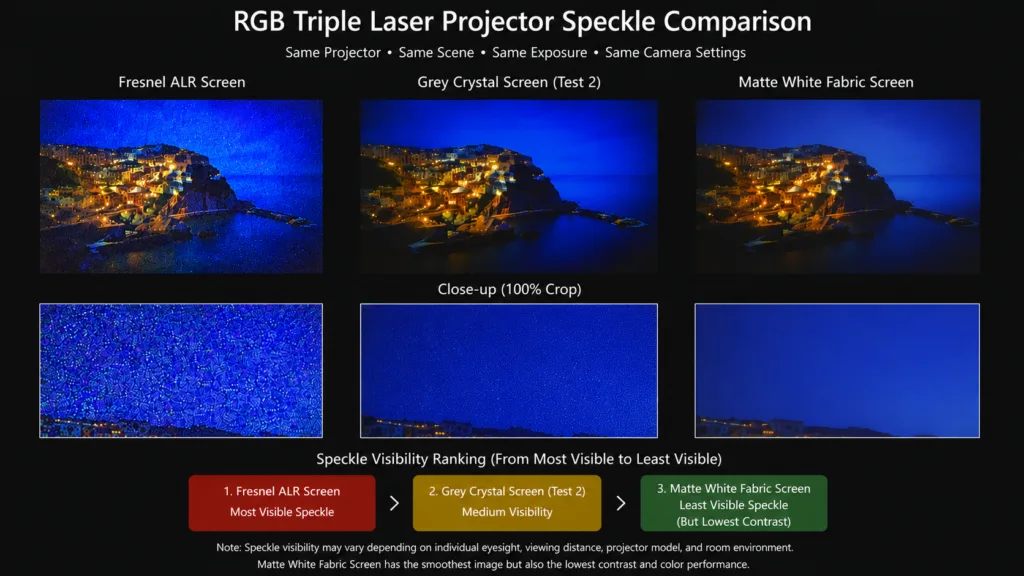
During our internal testing with RGB triple laser projectors and multiple screen materials, we observed noticeable differences in perceived speckle visibility.
Generally speaking:
| Screen Material | Perceived Speckle | Contrast | Ambient Light Rejection |
|---|---|---|---|
| Matte White Fabric | Lower | Lowest | None |
| Grey Crystal | Low | Good | Moderate |
| Standard Fresnel ALR | Higher | Excellent | Excellent |
| RGB-Optimized Fresnel ALR | Lower | Excellent | Excellent |
These observations are based on testing performed under the same projector, camera settings, and viewing conditions.
Actual results may vary depending on the projector model, screen construction, viewing distance, and room environment.
Choosing the Best Screen for RGB Triple Laser Projectors
The ideal screen depends on your priorities.
If your priority is the lowest visible speckle
A matte white screen generally produces the smoothest image, although it sacrifices ambient light rejection and contrast.
If you want a balance between image quality and lower speckle
Grey Crystal screen materials are an excellent choice.
If you prioritize maximum contrast and bright-room performance
A dedicated Fresnel screen designed specifically for RGB triple laser projectors can provide outstanding overall performance.
Dedicated Fresnel screens optimized for RGB triple laser projectors can provide an excellent balance between:
- Ambient light rejection
- High contrast performance
- TV-like image quality
- Reduced perceived speckle
For users who want both premium image quality and better speckle performance, these specialized Fresnel screens can be an excellent solution.
Common Misconceptions
Myth 1: More expensive screens always produce less speckle.
Not necessarily.
Different screen technologies are optimized for different purposes.
Myth 2: Speckle means the projector is defective.
False.
Speckle is a normal optical phenomenon associated with coherent laser light.
Myth 3: Every user sees speckle equally.
False.
Perception varies significantly between individuals.
Final Thoughts
Laser speckle is a natural characteristic of RGB triple laser projection systems and cannot usually be eliminated completely.
However, its visibility can often be significantly reduced by selecting the right screen technology and optimizing the viewing environment.
Based on our internal testing and practical experience:
- Matte white screens generally show the lowest visible speckle but provide the lowest contrast.
- Grey Crystal screens offer an excellent balance between reduced speckle and improved image contrast.
- Standard Fresnel screens provide outstanding contrast and ambient light rejection, although speckle may be more noticeable in some situations.
- Dedicated Fresnel screens optimized for RGB triple laser projectors can provide both excellent image performance and improved speckle characteristics.
The ideal solution ultimately depends on your projector, room environment, and personal viewing preferences.
FAQs
Can laser speckle be completely removed?
No. It is a natural optical phenomenon, but its visibility can often be significantly reduced.
Which screen has the least visible speckle?
In general, matte white screens produce the lowest perceived speckle, although they also provide the lowest contrast in bright rooms.
Does Grey Crystal screen reduce laser speckle?
Based on our internal testing, Grey Crystal screen materials can reduce the perceived visibility of laser speckle while maintaining good image contrast.
Are Fresnel screens suitable for RGB triple laser projectors?
Yes. Dedicated Fresnel screens designed specifically for RGB triple laser projectors can provide excellent contrast and ambient light rejection while helping optimize overall image quality.
Does viewing distance affect speckle?
Yes. Speckle is generally less noticeable at normal home theater viewing distances than when viewed very close to the screen.
Discover Professional Screen Solutions
At Cynthia Screen, we develop projection screen solutions for a wide range of projector technologies, including RGB triple laser systems.
Our product portfolio includes:
- RGB Triple Laser Optimized Fresnel Screens
- Grey Crystal Screens
- Standard Fresnel ALR Screens
- Floor Rising UST Screens
- Fixed Frame Screens
- Motorized Projection Screens
Whether your priority is maximum contrast, reduced speckle, or an optimal balance between the two, we can help you choose the screen that best matches your projector and viewing environment.
Visit www.mayoga.it to learn more.
Follow us: Facebook
Subscribe : YouTube
Contact us directly: [email protected]
The post How to Reduce Laser Speckle on Projector Screens first appeared on Cynthia Screen | Professional Projection Screen Manufacturer.
]]>The post Triple Laser Projector Speckle: What It Is and How to Reduce It first appeared on Cynthia Screen | Professional Projection Screen Manufacturer.
]]>What is the Triple Laser Projector Speckle:Three-color laser projectors have become increasingly popular in recent years thanks to their outstanding brightness, wide color gamut, and excellent color performance. Many modern home theater projectors and laser TV systems now use RGB laser light sources to achieve vivid and lifelike images.
However, some users notice a phenomenon known as laser speckle when using a three-color laser projector.
Speckle can affect image smoothness and may become more noticeable on certain screen materials or in specific viewing conditions.
In this article, we explain what laser speckle is, why it occurs, and how different projection screen materials can help reduce its visibility.
What Is Laser Speckle?
Laser speckle is a grainy or shimmering pattern that may appear on a projected image when coherent laser light reflects from a projection screen.
Unlike traditional lamp-based or LED projectors, laser projectors use highly coherent light. When this coherent light interacts with microscopic surface structures on a screen, interference patterns can occur.
The result is a fine sparkling texture that some viewers may notice, especially in:
- Bright scenes
- Solid color backgrounds
- White image areas
- Large projected images
Speckle does not indicate a defect in the projector or the screen. It is a natural optical phenomenon associated with laser projection systems.
Why Is Speckle More Common with Three-Color Laser Projectors?
Most modern laser projectors fall into one of three categories:
Single Laser + Phosphor
These projectors typically use a blue laser combined with a phosphor wheel to generate additional colors.
Speckle is usually less noticeable.
Dual Laser Systems
Some projectors use multiple laser wavelengths and may show moderate speckle characteristics.
RGB Three-Color Laser Systems
These projectors use separate red, green, and blue laser light sources.
Advantages include:
- Higher brightness
- Wider color gamut
- Better color accuracy
However, because RGB laser systems use highly coherent laser light across all primary colors, they are generally more likely to exhibit visible speckle.
Does Every User See Speckle?
Not necessarily.
The visibility of speckle depends on multiple factors:
- Individual visual sensitivity
- Viewing distance
- Screen material
- Projector optical design
- Room lighting conditions
- Image content
Some users notice speckle immediately, while others may rarely see it during normal viewing.
How Projection Screen Material Affects Speckle
Screen material plays a major role in how visible laser speckle appears.
Different surfaces interact with laser light differently.
Matte White Screens
Traditional matte white screens often have relatively smooth reflective properties.
Advantages:
- Natural color reproduction
- Wide viewing angles
However, depending on surface texture and projector type, speckle may still be visible.
ALR Screens
Ambient Light Rejecting (ALR) screens use optical structures to improve contrast and reduce ambient light interference.
Because ALR screens use more complex surface structures, speckle behavior can vary significantly between different materials and manufacturers.
The relationship is not simply:
ALR = more speckle
or
ALR = less speckle
The actual result depends on the specific material design.
Fresnel Screens
Fresnel screens use precision optical structures to direct projected light toward viewers while rejecting ambient light.
Many Fresnel screens can provide:
- Excellent contrast
- Strong ambient light rejection
- Improved daytime performance
The visibility of speckle depends on the optical structure and manufacturing process used by the screen manufacturer.
Grey Crystal and Anti-Speckle Screen Materials
Some projection screen materials are specifically designed to reduce the visibility of laser speckle.
These materials often use:
- Specialized surface textures
- Optical diffusion layers
- Multi-layer coating technologies
The goal is to reduce coherent light interference patterns without significantly degrading image sharpness.
As a result, many users perceive a smoother image with reduced speckle visibility.
Can Speckle Be Eliminated Completely?
In practical applications, completely eliminating laser speckle is extremely difficult.
This is because speckle originates from the fundamental properties of coherent laser light.
However, it can often be significantly reduced through:
- Improved projector optical design
- Specialized screen materials
- Optical diffusion technology
- Appropriate viewing distance
Most modern premium laser projection systems focus on reducing speckle to a level that is minimally noticeable during normal viewing.
Does Viewing Distance Affect Speckle?
Yes.
Speckle tends to become less noticeable as viewing distance increases.
For example:
- Sitting very close to the screen may make speckle easier to observe.
- Sitting at a normal home theater viewing distance often reduces its visibility.
This is one reason why speckle complaints are sometimes more common during close-up demonstrations than during regular movie viewing.
Does Room Lighting Affect Speckle?
Room lighting can influence how visible speckle appears.
In a completely dark room:
- High contrast images may make speckle more noticeable in certain scenes.
In moderate ambient light:
- Some viewers perceive less speckle because the overall visual contrast is reduced.
However, lighting is usually a secondary factor compared to screen material and projector design.
Choosing a Screen for a Three-Color Laser Projector
When selecting a screen for an RGB laser projector, it is important to consider more than just gain and ambient light rejection.
Key factors include:
Image Contrast
A quality screen should maintain strong contrast performance.
Color Accuracy
The screen should preserve the projector’s color capabilities.
Viewing Angle
Different screen technologies provide different viewing experiences.
Speckle Performance
Materials designed with anti-speckle characteristics may provide a smoother visual experience.
Application Environment
Living rooms, dedicated theaters, and commercial installations may require different screen solutions.
Common Misconceptions About Laser Speckle
Myth 1: Speckle Means the Screen Is Defective
False.
Speckle is a natural optical phenomenon associated with laser projection.
Myth 2: All Three-Color Laser Projectors Have Severe Speckle
False.
The level of visible speckle varies significantly between projector models and screen materials.
Myth 3: Every ALR Screen Increases Speckle
False.
Different ALR materials behave differently with laser light.
Some screen materials are specifically engineered to reduce perceived speckle.
Myth 4: Speckle Cannot Be Reduced
False.
While it cannot always be completely eliminated, modern optical technologies can significantly reduce its visibility.
Our Testing Experience with RGB Triple Laser Projectors
During our internal testing with RGB triple laser projectors and different projection screen materials, we observed that the perceived visibility of laser speckle can vary significantly depending on the screen surface.
In our tests, we found that:
- White fabric generally showed the least visible speckle, but also delivered the lowest contrast and weakest image depth.
- Fresnel ALR screens provided excellent contrast and ambient light rejection, but speckle could be more noticeable due to their highly directional optical structure.
- Grey Crystal screens showed lower perceived speckle than Fresnel screens while still maintaining good contrast performance.
It is important to note that speckle perception varies from person to person and can also be affected by projector design, viewing distance, room lighting, and image content.
Final Thoughts
Three-color laser projectors offer some of the most impressive image quality available in today’s projection market, including exceptional brightness, wide color gamut coverage, and vivid color reproduction.
Like all laser projection systems, they may exhibit laser speckle under certain conditions.
Fortunately, the visibility of speckle can often be minimized through careful selection of projector technology, viewing environment, and projection screen material.
For users seeking the best balance between image quality, contrast, and viewing comfort, choosing a screen material specifically designed for laser projection can make a meaningful difference.
Understanding the causes of laser speckle is the first step toward building a better and more enjoyable home theater experience.
FAQs
What causes laser speckle?
Laser speckle is caused by interference patterns created when coherent laser light reflects from a projection screen surface.
Do all RGB laser projectors have speckle?
Most RGB laser projectors can exhibit some level of speckle, but visibility varies depending on the projector, screen material, and viewing conditions.
Can a projection screen reduce speckle?
Certain screen materials and optical coatings can help reduce the visibility of laser speckle.
Is laser speckle harmful?
No. Speckle is a normal optical phenomenon and does not indicate damage or defects.
What type of screen is best for a three-color laser projector?
The ideal screen depends on the projector type, room conditions, desired contrast level, and speckle reduction requirements.
Choosing the Right Screen for RGB Triple Laser Projectors
For users who prioritize maximum contrast and ambient light rejection, dedicated screens designed specifically for RGB triple laser projectors may provide the best overall experience.
Based on our testing, Grey Crystal screen materials can also help reduce the perceived visibility of laser speckle compared with some highly directional ALR screen structures, while still maintaining good image quality.
The ideal solution depends on the balance you want between:
- Contrast performance
- Ambient light rejection
- Viewing angle
- Speckle visibility
- Room environment
Testing different screen materials with your specific projector is always the most reliable way to determine the best match for your setup.
Contact us for more information:
The post Triple Laser Projector Speckle: What It Is and How to Reduce It first appeared on Cynthia Screen | Professional Projection Screen Manufacturer.
]]>The post Best UST Projector Screen Setup Guide first appeared on Cynthia Screen | Professional Projection Screen Manufacturer.
]]>Ultra short throw (UST) projectors have become one of the most popular solutions for modern home theaters.
They allow users to enjoy a large screen experience (100–150 inches) without ceiling mounting or long cable installation.
However, many users overlook one critical fact:
The screen is just as important as the projector itself.
In UST setups, the screen can determine up to 70% of the final image quality.
This guide explains how to build the best UST projector screen setup in a real home environment.
📌 What Is a UST Projector Screen Setup?
A complete UST setup includes:
- Ultra short throw projector
- Dedicated UST ALR screen
- Precise alignment system
- Stable cabinet or media console
Unlike traditional projection systems, UST setups rely heavily on optical screen design, not just projector brightness.
🧪 Why Normal Screens Don’t Work Well for UST Projectors
Many users start with a matte white screen, assuming all projection screens are the same.
This often leads to:
- Washed-out image in daylight
- Low contrast in bright rooms
- Weak black levels
- Visible light reflection from ceiling lighting
Reason:
UST projectors project light from a very low and steep angle.
Standard screens reflect light in all directions, including unwanted ambient light.
🧩 Best Screen Types for UST Setup
1️⃣ Fresnel ALR Screen
Key Features:
- Extremely strong contrast performance
- High ambient light rejection
- TV-like image depth
- Excellent for bright environments
Best for:
- Bright living rooms
- Premium home theaters
- Daytime viewing setups
2️⃣ Black Grid ALR Screen
Key Features:
- Balanced performance
- Wider viewing angles than Fresnel
- Good ambient light control
- Flexible seating arrangement
Best for:
- Family rooms
- Multi-viewer environments
- Mid-range UST systems
3️⃣ Matte White Screen (Reference Only)
Key Features:
- Wide viewing angle
- Natural color reproduction
- Lower cost
Limitations:
- Poor performance in bright rooms
- Low contrast under ambient light
📏 Best Screen Size for UST Setup
Most common UST screen sizes:
- 100 inch → Small/medium rooms
- 120 inch → Most popular standard
- 130–150 inch → Large dedicated rooms
👉 Recommended sweet spot: 120 inch
It offers the best balance between:
- Brightness
- Immersion
- Room compatibility
📐 UST Projector Placement Guide
Correct placement is essential for image quality.
✔ Distance from Wall
Typically 10–50 cm depending on projector model
✔ Alignment
- Lens must be perfectly centered
- Screen and projector must align horizontally
✔ Stability
- Use a solid cabinet or media console
- Avoid vibration or uneven surfaces
💡 Room Lighting Recommendations
UST projectors are designed for real living rooms.
However, lighting still affects performance.
✔ Ideal conditions:
- Indirect lighting
- Controlled ceiling lights
- Curtains for daylight control
❌ Avoid:
- Direct sunlight on screen
- Strong overhead lights hitting screen surface
⚠ Common UST Setup Mistakes
❌ Using wrong screen type
UST projector + white screen = reduced contrast
❌ Oversized screen selection
Too large → brightness drop + eye fatigue
❌ Poor alignment
Leads to:
- Geometry distortion
- Focus inconsistency
❌ Ignoring viewing height
Incorrect height affects comfort and immersion
🧠 Key Takeaways
A high-quality UST setup depends on:
- Correct screen technology
- Proper room lighting
- Accurate projector placement
- Appropriate screen size
👉 The screen is not an accessory — it is part of the imaging system.
🎯 Final Recommendation
Choose based on your environment:
- Bright living room → Fresnel ALR screen
- Family usage → Black Grid ALR screen
- Dark dedicated room → Matte white screen
🚀 Upgrade Your Home Theater
Cynthia Screen provides professional projection screen solutions:
👉 Visit: www.mayoga.it
The post Best UST Projector Screen Setup Guide first appeared on Cynthia Screen | Professional Projection Screen Manufacturer.
]]>The post Best Floor Rising ALR Screen Guide first appeared on Cynthia Screen | Professional Projection Screen Manufacturer.
]]>Floor Rising ALR Screen – Ultra short throw (UST) projectors have transformed home entertainment by making it possible to enjoy a 100-inch or 120-inch image without mounting a projector on the ceiling.
As UST projectors become more popular, floor rising ALR screens have emerged as one of the most elegant and practical screen solutions for modern living rooms.
Unlike fixed frame screens that remain visible all the time, a floor rising ALR screen stays hidden when not in use and automatically rises into position when activated.
For homeowners who want a clean interior design without sacrificing image quality, this combination of convenience and performance is difficult to match.
This guide explains everything you need to know about choosing the best floor rising ALR screen.
What Is a Floor Rising ALR Screen?
A floor rising ALR screen is a motorized projection screen that extends vertically from a floor-mounted housing and uses Ambient Light Rejecting (ALR) technology to improve image quality.
The screen remains concealed inside its aluminum housing when not in use.
When powered on, the screen rises smoothly from the base and stops at the preset viewing height.
Most floor rising ALR screens are designed specifically for:
- Ultra short throw projectors
- Laser TV systems
- Living room home theaters
- Multi-purpose entertainment spaces
Why ALR Technology Matters
Traditional matte white screens reflect light from all directions.
This means they reflect:
- Projector light
- Ceiling lights
- Window light
- Room reflections
As ambient light increases, image contrast decreases.
Black areas become gray and colors lose depth.
ALR screen materials are engineered to selectively reflect projector light while reducing unwanted ambient light.
The result is:
- Better contrast
- Improved black levels
- Enhanced color saturation
- Better daytime visibility
This advantage becomes especially important in living rooms where complete light control is rarely possible.
Why Floor Rising Screens Are Popular for UST Projectors
Most UST projectors are placed on a cabinet directly beneath the screen.
A floor rising screen naturally complements this installation style.
Benefits include:
- No ceiling installation required
- No wall modifications required
- Cleaner room appearance
- Easy integration with furniture
- Hidden screen when not in use
For many homeowners, floor rising screens provide a more elegant solution than traditional wall-mounted screens.
Typical Floor Rising ALR Screen Structure
Screen Housing
The screen material is stored inside a floor-standing aluminum enclosure.
The housing protects the screen from:
- Dust
- Accidental contact
- Environmental damage
Motor System
A tubular motor raises and lowers the screen automatically.
A quality motor should provide:
- Quiet operation
- Smooth movement
- Consistent positioning
Tension System
Most premium floor rising screens use side-tension systems.
Benefits include:
- Improved flatness
- Reduced edge curling
- Better image uniformity
Flatness becomes increasingly important as screen size grows.
ALR Screen Material
The material is the most important component affecting image quality.
Different manufacturers may use different optical structures depending on the intended projector type.
Types of Floor Rising ALR Screens
UST ALR Screens
These are designed specifically for ultra short throw projectors.
They are engineered to reflect light arriving from below the screen.
Best for:
- Laser TV systems
- UST projectors
- Living room home theaters
Standard Throw ALR Screens
These screens are optimized for traditional projector placement.
They are generally not recommended for UST projectors.
Always verify projector compatibility before purchasing.
Key Benefits of a Floor Rising ALR Screen
Hidden Design
When retracted, the screen is almost invisible.
This creates a clean and modern living space.
Better Daytime Viewing
ALR technology helps preserve image quality even when room lights are on.
This is one of the biggest reasons people choose ALR screens.
Improved Contrast
Reducing ambient light reflections increases perceived contrast.
Dark scenes appear more detailed and cinematic.
Enhanced Black Levels
Although projection systems cannot produce true OLED-style blacks, ALR technology helps improve black-level perception significantly.
Flexible Installation
No ceiling cavity or permanent wall installation is required.
This makes floor rising screens suitable for:
- Apartments
- Condominiums
- Rental properties
- Multi-purpose rooms
Screen Size Recommendations
The most common floor rising ALR screen sizes are:
| Screen Size | Typical Application |
|---|---|
| 100 Inch | Most living rooms |
| 120 Inch | Dedicated entertainment rooms |
| 130 Inch | Large home theater spaces |
For most users, 100-inch and 120-inch models offer the best balance between immersion and room compatibility.
Floor Rising ALR Screen vs Fixed Frame ALR Screen
| Feature | Floor Rising ALR Screen | Fixed Frame ALR Screen |
|---|---|---|
| Hidden When Not Used | Yes | No |
| Room Aesthetics | Excellent | Good |
| Installation Flexibility | High | Moderate |
| Flatness | Very Good | Excellent |
| Portability | Moderate | Low |
| Living Room Integration | Excellent | Good |
Fixed frame screens remain the reference standard for ultimate flatness, but floor rising screens offer significantly better room integration.
Floor Rising ALR Screen vs Ceiling Recessed Screen
| Feature | Floor Rising Screen | Ceiling Recessed Screen |
|---|---|---|
| Ceiling Work Required | No | Yes |
| Installation Difficulty | Easier | More Complex |
| UST Compatibility | Excellent | Limited |
| Room Integration | Excellent | Excellent |
| Flexibility | Higher | Lower |
Common Buying Mistakes
Choosing Based on Price Alone
The screen has a major impact on image quality.
Selecting the cheapest option often limits projector performance.
Ignoring Projector Compatibility
Not all ALR screens are designed for UST projectors.
Compatibility should always be verified.
Overlooking Screen Flatness
Flatness affects focus consistency across the image.
Premium tension systems help maintain a smoother surface.
Choosing the Wrong Size
A larger screen is not always better.
Screen size should match:
- Viewing distance
- Room dimensions
- Projector brightness
Who Should Buy a Floor Rising ALR Screen?
A floor rising ALR screen is ideal for users who:
- Own a UST projector
- Watch content during daytime
- Want a clean living room setup
- Prefer hidden screen installations
- Need flexible room usage
It is one of the most practical solutions for modern laser TV systems.
Is a Floor Rising ALR Screen Worth It?
For many homeowners, yes.
The combination of:
- Hidden design
- Motorized convenience
- Ambient light rejection
- UST compatibility
makes floor rising ALR screens one of the most desirable projection screen categories available today.
For users seeking a balance between aesthetics and performance, they often represent the ideal solution.
Final Thoughts
The best floor rising ALR screen is not necessarily the most expensive one.
The right choice depends on:
- Projector type
- Room brightness
- Screen size requirements
- Installation preferences
- Viewing habits
For UST projector owners, a high-quality floor rising ALR screen can dramatically improve contrast, black levels, and daytime usability while maintaining a clean and elegant living space.
As laser TV systems continue to grow in popularity, floor rising ALR screens are likely to remain one of the most attractive screen solutions for modern home entertainment.
FAQs
What is a floor rising ALR screen?
A motorized projection screen that rises from a floor-mounted housing and uses ambient light rejecting technology.
Are floor rising screens good for UST projectors?
Yes. Many floor rising screens are specifically designed for UST projector systems.
Do floor rising ALR screens improve image quality?
Yes. They can improve contrast, black levels, and visibility in rooms with ambient light.
What size floor rising screen is most popular?
100-inch and 120-inch models are the most commonly used sizes for home theater applications.
Are floor rising ALR screens worth it?
For users seeking a clean installation and better daytime viewing performance, many consider them well worth the investment.
Upgrade Your Home Theater with Cynthia Screen
Cynthia Screen specializes in premium projection screen solutions for modern home theaters and laser TV systems.
Our product range includes:
- Drum Clamps
- Senior Executive Chair
- Topicals & Tinctures
- Tv Remotes
- Skyworth Tvs
- Sumptuous Saxony Carpet
Whether you are building a luxury home theater or upgrading your living room laser TV setup, our team can help you find the ideal screen solution.
Learn more at:
The post Best Floor Rising ALR Screen Guide first appeared on Cynthia Screen | Professional Projection Screen Manufacturer.
]]>The post Projector Screen Size Guide for Home Theater first appeared on Cynthia Screen | Professional Projection Screen Manufacturer.
]]>Many people focus on projector specifications such as brightness and resolution but overlook the impact of screen size on the overall viewing experience.
A screen that is too small may reduce immersion, while a screen that is too large can cause eye strain and image quality issues.
In this Projector Screen Size Guide, you’ll learn:
- How to choose the right screen size
- Recommended viewing distances
- Screen size recommendations for different rooms
- UST projector screen sizing tips
- Common mistakes to avoid
Whether you’re building a dedicated home theater or a living room entertainment system, this guide will help you find the perfect screen size.
Why Screen Size Matters
The screen is the centerpiece of your projection system.
The right size helps create:
- Better immersion
- Improved viewing comfort
- More cinematic experiences
- Optimal image quality
Choosing the wrong size can result in:
- Visible pixels
- Eye fatigue
- Reduced brightness
- Poor viewing angles
That’s why screen size should be considered before purchasing your projector.
How to Measure Projector Screen Size
Projector screens are measured diagonally from corner to corner, just like televisions.
Common home theater screen sizes include:
- 80 inch
- 92 inch
- 100 inch
- 110 inch
- 120 inch
- 135 inch
- 150 inch
Most modern home theater installations use screens between 100 and 120 inches.
Recommended Viewing Distance
Viewing distance is one of the most important factors when selecting screen size.
A simple rule is:
Minimum Viewing Distance
1.2 × Screen Width
Comfortable Viewing Distance
1.5 × Screen Width
Maximum Viewing Distance
2.5 × Screen Width
The following table provides general recommendations.
| Screen Size | Recommended Viewing Distance |
|---|---|
| 80 Inch | 2.4 – 3.2 m |
| 100 Inch | 3.0 – 4.0 m |
| 120 Inch | 3.5 – 4.8 m |
| 135 Inch | 4.0 – 5.4 m |
| 150 Inch | 4.5 – 6.0 m |
Best Screen Size by Room Size
Small Rooms
Room Depth: Under 3 meters
Recommended Screen Size:
- 80 inch
- 92 inch
- 100 inch
Ideal for:
- Apartments
- Bedrooms
- Small media rooms
Medium Rooms
Room Depth: 3 to 5 meters
Recommended Screen Size:
- 100 inch
- 110 inch
- 120 inch
Ideal for:
- Living rooms
- Family entertainment spaces
- Most home theaters
Large Rooms
Room Depth: Over 5 meters
Recommended Screen Size:
- 135 inch
- 150 inch
- 180 inch
Ideal for:
- Dedicated home theaters
- Commercial entertainment rooms
- Luxury cinema installations
Screen Size for UST Projectors
Ultra Short Throw (UST) projectors are becoming increasingly popular due to their convenience and clean installation.
Most UST projector owners choose:
- 100 inch screen
- 120 inch screen
These sizes offer an excellent balance between:
- Brightness
- Viewing comfort
- Room compatibility
For UST projectors, using a dedicated ALR screen can significantly improve image quality.
Screen Size and Projector Brightness
As screen size increases, image brightness decreases.
Larger screens spread projector light over a larger surface area.
General recommendations:
Up to 100 Inches
Recommended Brightness:
- 2,000–2,500 Lumens
100–120 Inches
Recommended Brightness:
- 2,500–3,500 Lumens
120–150 Inches
Recommended Brightness:
- 3,500 Lumens or Higher
For bright rooms, additional brightness may be required.
100 Inch vs 120 Inch Screen
One of the most common questions is whether to choose a 100-inch or 120-inch screen.
Choose 100 Inch If:
- Room size is limited
- Viewing distance is under 3.5 meters
- You prefer higher perceived brightness
Choose 120 Inch If:
- Viewing distance exceeds 3.5 meters
- You want a more immersive experience
- Your projector has sufficient brightness
For many home theater users, 120 inches is considered the sweet spot.
Common Screen Aspect Ratios
16:9
The most common format for:
- Movies
- Streaming
- Gaming
- Television
Recommended for most users.
2.35:1
Popular for:
- Cinemascope movies
- Dedicated home theaters
Provides a more cinematic viewing experience.
4:3
Primarily used for:
- Presentations
- Education
- Legacy content
Less common in modern home theaters.
Common Screen Size Mistakes
Buying the Largest Screen Possible
Bigger isn’t always better.
Screen size should match room dimensions and viewing distance.
Ignoring Projector Brightness
Large screens require more projector brightness.
Forgetting Seating Layout
Everyone should have a comfortable viewing angle.
Not Considering Room Lighting
Bright rooms may require ALR screens for larger screen sizes.
What Is the Best Projector Screen Size?
There is no single perfect size for every room.
However, for most home theater applications:
100 Inch Screen
Best for:
- Small to medium rooms
- UST projector setups
- Living rooms
120 Inch Screen
Best for:
- Dedicated home theaters
- Medium to large rooms
- Maximum immersion
These two sizes remain the most popular choices worldwide.
Final Thoughts
Choosing the right projector screen size is essential for creating an enjoyable and immersive home theater experience.
The best screen size depends on:
- Room dimensions
- Viewing distance
- Projector brightness
- Seating arrangement
- Personal preference
For most homeowners, a 100-inch or 120-inch screen offers the ideal balance between image quality, immersion, and viewing comfort.
Before purchasing a screen, always consider your room layout and projector specifications to ensure the best possible performance.
FAQs
What is the most popular projector screen size?
100-inch and 120-inch screens are the most popular sizes for home theater installations.
Is a 120-inch screen too big?
Not if your viewing distance is at least 3.5 meters and your projector has sufficient brightness.
How far should I sit from a 100-inch screen?
A viewing distance of approximately 3 to 4 meters is generally recommended.
What screen size is best for UST projectors?
Most UST projector users choose either a 100-inch or 120-inch screen.
Does a larger screen reduce brightness?
Yes. As screen size increases, image brightness is spread over a larger surface area.
Find the Perfect Screen for Your Home Theater
Cynthia Screen offers a complete range of projection screen solutions for home theaters, living rooms, and commercial applications.
Our product lineup includes:
- Table Tennis
- Sectional Modular
- Ultrasound Transducers
- Riscaldatore A Induzione
- Urban Poly
- Sweet Exotics Weed
Whether you’re looking for a 100-inch laser TV screen or a large-format home theater solution, our team can help you select the ideal screen size for your projector and room.
Visit www.mayoga.it to learn more.
The post Projector Screen Size Guide for Home Theater first appeared on Cynthia Screen | Professional Projection Screen Manufacturer.
]]>The post What Is CLR Screen for UST Projectors? first appeared on Cynthia Screen | Professional Projection Screen Manufacturer.
]]>One term that appears frequently in the UST projector market is:
CLR Screen
But what exactly is a CLR screen, and why is it so important for modern laser TV and UST projector systems?
In this guide, we will explain:
- What a CLR screen is
- How CLR screens work
- Why they are designed for UST projectors
- The difference between CLR and traditional screens
- CLR vs ALR screen
- The advantages and disadvantages of CLR screens
If you are planning a UST projector setup, understanding CLR screen technology can help you achieve dramatically better image quality.
What Is CLR Screen?
CLR stands for:
Ceiling Light Rejecting
A CLR screen is a specialized projection screen designed specifically for ultra short throw (UST) projectors.
Its primary purpose is to:
- Reflect projector light toward viewers
- Reject overhead ambient light
- Improve contrast and black levels
- Enhance daytime viewing performance
CLR screens are part of the broader ALR (Ambient Light Rejecting) screen category, but they are specially optimized for the unique projection angle of UST projectors.
Why UST Projectors Need CLR Screens
UST projectors sit very close to the screen and project light upward at a steep angle.
This creates unique optical challenges.
Traditional projection screens reflect light in all directions, including:
- Projector light
- Ceiling light
- Window light
- Room reflections
As a result, standard white screens often produce:
- Washed-out images
- Poor contrast
- Weak black levels
- Poor daytime visibility
CLR screens solve this problem by controlling how light is reflected.
How Does a CLR Screen Work?
CLR screens use special optical structures, often called sawtooth layers or directional light structures.
These structures are engineered to:
- Accept projector light from below
- Reflect that light toward the viewer
- Reject light coming from above
This means ceiling lights and ambient room lighting are significantly reduced on the screen surface.
The result is:
- Better contrast
- Darker blacks
- More vivid colors
- Improved image depth
even in bright rooms.
CLR Screen vs Regular Projection Screen
The biggest difference between a CLR screen and a traditional projection screen is ambient light handling.
| Feature | CLR Screen | Regular White Screen |
|---|---|---|
| Ambient Light Rejection | Strong | None |
| Daytime Viewing | Excellent | Poor |
| Contrast | Higher | Lower |
| Black Levels | Better | Average |
| UST Compatibility | Excellent | Limited |
| Bright Room Performance | Excellent | Weak |
Traditional matte white screens work best in completely dark rooms.
CLR screens are designed for modern living rooms and bright viewing environments.
CLR Screen vs ALR Screen
Many people confuse CLR screens with ALR screens.
In reality:
CLR is a type of ALR screen.
ALR stands for Ambient Light Rejecting and includes several technologies such as:
- CLR screens (Black Grid screens)
- Fresnel screens
CLR screens are specifically optimized for:
- Ceiling light rejection
- UST projector systems
This makes them ideal for laser TV and living room home theaters.
Advantages of CLR Screens
Better Contrast
CLR screens improve perceived contrast by reducing unwanted ambient light reflection.
Improved Daytime Viewing
One of the biggest advantages is better image visibility during daytime use.
Stronger Black Levels
Ambient light rejection helps dark scenes appear deeper and more cinematic.
Excellent for Living Rooms
CLR screens are designed for real-world home environments instead of fully dark theater rooms.
Optimized for UST Projectors
CLR screens are engineered specifically for ultra short throw projection angles.
Disadvantages of CLR Screens
Narrower Viewing Angles
Compared to matte white screens, some CLR screens may have reduced side viewing performance.
Higher Cost
CLR screens are generally more expensive than standard projection screens.
Projector Compatibility Matters
CLR screens are designed mainly for UST projectors and may not work properly with standard long throw projectors.
Who Should Buy a CLR Screen?
A CLR screen is ideal if you:
- Use a UST projector
- Watch movies during daytime
- Have ambient light in the room
- Want better contrast and black levels
- Prefer a TV-like viewing experience
CLR screens are especially popular for:
- Laser TV systems
- Modern living room theaters
- Large-screen entertainment setups
Are CLR Screens Worth It?
For many UST projector users, absolutely yes.
A high-quality CLR screen can dramatically improve:
- Contrast
- Black levels
- Daytime visibility
- Overall image quality
In many cases, upgrading the screen creates a bigger improvement than upgrading the projector itself.
Common Mistakes to Avoid
Using Standard White Screen with UST Projector
This often results in washed-out image quality.
Ignoring Ambient Light Conditions
Room lighting has a major impact on projector performance.
Choosing Based Only on Price
A low-quality screen can limit the performance of a premium projector.
Final Thoughts
So, what is a CLR screen?
A CLR screen is a specialized ambient light rejecting screen designed for ultra short throw projectors.
By rejecting overhead light and directing projector light toward viewers, CLR screens dramatically improve:
- Contrast
- Black levels
- Daytime viewing
- Overall home theater performance
For modern UST projector and laser TV setups, CLR screens have become one of the most important upgrades for achieving a premium cinematic viewing experience.
FAQs
What does CLR screen mean?
CLR stands for Ceiling Light Rejecting.
Are CLR screens only for UST projectors?
Yes. CLR screens are primarily designed for ultra short throw projectors.
Is CLR screen better than white screen?
For bright rooms and daytime viewing, CLR screens usually perform much better.
Does CLR screen improve contrast?
Yes. CLR screens help improve contrast by reducing ambient light reflection.
Are CLR screens worth it?
For UST projector users in living rooms or bright environments, many consider them well worth the investment.
Upgrade Your UST Home Theater Experience
At Cynthia Screen, we specialize in premium UST ALR projection screens designed for modern home theater applications.
Our product range includes:
Whether you are building a laser TV setup or searching for the ideal screen for your UST projector, our team can help you find the perfect solution.
Explore more at:
https://mayoga.it
The post What Is CLR Screen for UST Projectors? first appeared on Cynthia Screen | Professional Projection Screen Manufacturer.
]]>The post CLR Screen vs Fresnel Screen: Which UST ALR Screen Is Better? first appeared on Cynthia Screen | Professional Projection Screen Manufacturer.
]]>Two of the most discussed options today are:
- CLR screens
- Fresnel screens
Both are designed for UST projectors and both aim to improve:
- Contrast
- Black levels
- Daytime viewing
- Ambient light rejection
However, they use very different optical technologies and perform differently depending on the environment and viewing setup.
So which one is better?
In this guide, we will compare:
- CLR screens
- Fresnel screens
and explain:
- How they work
- Their key differences
- Pros and cons
- Which environments they perform best in
- Which screen is better for your UST home theater
If you are building a modern laser TV or UST projector setup, this guide will help you make the right decision.
CLR Screen vs Fresnel Screen
What Is a CLR Screen?
CLR stands for Ceiling Light Rejecting.
A CLR screen is a type of ALR (Ambient Light Rejecting) screen specifically designed for ultra short throw projectors.
CLR screens use layered optical structures to:
- Reflect projector light toward viewers
- Reject overhead ambient light
- Improve image contrast
- Enhance daytime viewing
Because UST projectors project light upward from below the screen, CLR screens are engineered to capture this light angle efficiently.
CLR screens are widely used in:
- Living room home theaters
- Laser TV systems
- Bright entertainment spaces
What Is a Fresnel Screen?
A Fresnel screen is another advanced ALR screen technology designed primarily for UST projectors.
Instead of layered structures, Fresnel screens use precision concentric optical rings to direct light very accurately toward the viewer.
This allows Fresnel screens to achieve:
- Extremely strong ambient light rejection
- Very high contrast
- Deep black levels
- TV-like image performance
Fresnel screens are now widely used in modern laser TV and UST home theater systems because they offer strong contrast and excellent ambient light rejection with increasingly competitive pricing.
CLR Screen vs Fresnel Screen – The Biggest Difference: Optical Structure
The core difference between CLR and Fresnel screens is how they control light.
CLR Screen Structure
CLR screens typically use:
- Sawtooth optical layers
- Black light-absorbing structures
- Directional reflection technology
They reject overhead light while reflecting projector light from below.
This creates balanced image performance with wider viewing flexibility.
Fresnel Screen Structure
Fresnel screens use microscopic concentric ring patterns inspired by Fresnel lens technology.
These rings focus projector light directly toward the viewing area while aggressively rejecting surrounding ambient light.
This creates stronger contrast and brightness concentration.
CLR Screen vs Fresnel Screen: Image Quality Comparison
| Feature | CLR Screen | Fresnel Screen |
|---|---|---|
| Ambient Light Rejection | Very Good | Excellent |
| Contrast | Very Good | Outstanding |
| Black Levels | Strong | Superior |
| Bright Room Performance | Excellent | Excellent |
| Viewing Angle | Wider | Moderate |
| Brightness Uniformity | Good | Excellent Center Brightness |
| Installation Tolerance | Easier | Requires Accurate Alignment |
| Price | Higher in Many Premium Models | More Competitive |
| Best For | Family Viewing | High Contrast Home Theater |
Which Screen Has Better Contrast?
Fresnel screens usually provide stronger contrast performance.
Because Fresnel optical structures direct light more precisely, they can maintain:
- Deeper blacks
- Higher perceived contrast
- Better HDR-like image depth
This is especially noticeable in bright environments.
For users seeking the most cinematic image quality, Fresnel screens are often considered one of the best choices for UST projector systems.
Which Screen Handles Ambient Light Better?
Both technologies perform well in ambient light, but Fresnel screens generally offer stronger light rejection.
Advantages of Fresnel screens include:
- Better daytime viewing
- Less image washout
- Improved black levels under room lighting
However, high-quality CLR screens still perform extremely well for most living room applications.
Which Screen Has Better Viewing Angle?
CLR screens usually provide wider viewing angles.
This makes them better for:
- Family rooms
- Large sofas
- Multiple seating positions
- Group movie watching
Fresnel screens prioritize directional image performance, so viewers sitting far off-center may notice:
- Reduced brightness
- Slight contrast loss
Why More UST Projector Users Are Choosing Fresnel Screens
As UST projector technology becomes more affordable, many home theater users are searching for screens that can maximize image quality in bright living rooms.
Fresnel screens are becoming increasingly popular because they offer:
- Excellent ambient light rejection
- Strong contrast performance
- Sharp image clarity
- Competitive pricing
- TV-like viewing experience
For many modern laser TV setups, Fresnel screens provide one of the best overall balances between performance and value.
Which Screen Is Better for UST Projectors?
Both are specifically designed for UST projectors.
However, the best choice depends on your priorities.
Choose Fresnel Screen If You Want:
- Maximum contrast
- Premium image quality
- Strong ambient light rejection
- TV-like viewing experience
- Competitive pricing
- Dedicated center seating
Ideal for:
- Luxury home theaters
- High-end laser TV systems
- Bright living rooms
Choose CLR Screen If You Want:
- Wider viewing angle
- Flexible seating arrangements
- Easier installation
- Balanced performance
- Family viewing experience
Ideal for:
- Family entertainment spaces
- Multi-seat viewing
- General living room use
CLR Screen vs Fresnel Screen:Which Screen Is Better for Daytime Viewing?
Fresnel screens usually perform slightly better in very bright daytime conditions.
Their aggressive ambient light rejection helps preserve:
- Black levels
- Shadow detail
- Contrast
However, CLR screens still provide excellent daytime performance compared to traditional white screens.
CLR Screen vs Fresnel Screen:Installation Differences
CLR Screen Installation
CLR screens are generally more forgiving during setup.
Small projector positioning errors usually have less impact on image quality.
Fresnel Screen Installation
Fresnel screens often require:
- More precise projector alignment
- Accurate installation height
- Careful viewing position optimization
This is because the optical structure is highly directional.
Are Fresnel Screens Worth It?
Fresnel screens have become increasingly attractive for users seeking high contrast and strong ambient light rejection without moving into extremely high pricing ranges.
For many UST projector users, Fresnel screens now offer an excellent balance between:
- Image quality
- Daytime performance
- Modern appearance
- Overall value
This is especially true for users who prioritize cinematic contrast and TV-like viewing performance.
CLR Screen vs Fresnel Screen : Common Mistakes When Choosing Between CLR and Fresnel
Focusing Only on Contrast
Viewing angle and seating arrangement also matter.
Ignoring Room Layout
Room lighting and seating positions heavily affect screen choice.
Choosing Based Only on Price
A cheaper screen may reduce the performance of an expensive UST projector.
Using Standard ALR Screen Instead of UST Screen
UST projectors require specially designed screen structures.
Final Thoughts
So, which is better: CLR screen or Fresnel screen?
The answer depends on your viewing priorities.
Fresnel screens are best for:
- Maximum contrast
- Strong ambient light rejection
- Premium cinematic image quality
- Competitive pricing
- Dedicated viewing positions
CLR screens are best for:
- Wider viewing angles
- Flexible seating layouts
- Balanced everyday performance
- Family entertainment environments
Both technologies dramatically outperform traditional projection screens in bright environments and modern living room home theaters.
Choosing the right screen depends on:
- Room brightness
- Seating arrangement
- Budget
- Viewing habits
- Desired image quality
With the right UST projector and screen combination, both CLR and Fresnel screens can deliver an impressive large-screen cinematic experience.
FAQs
Is Fresnel screen better than CLR screen?
Fresnel screens usually offer stronger contrast and ambient light rejection, while CLR screens often provide wider viewing angles.
What is the difference between CLR and Fresnel screen?
CLR screens use layered optical structures, while Fresnel screens use concentric optical ring technology.
Which screen is better for bright rooms?
Both perform well, but Fresnel screens generally provide stronger ambient light rejection.
Do Fresnel screens have narrow viewing angles?
Yes. Fresnel screens typically have narrower viewing angles than CLR screens.
Are CLR screens good for family rooms?
Yes. Their wider viewing angles make them ideal for multi-seat viewing environments.
Upgrade Your UST Home Theater Experience
At Cynthia Screen Official Website, we specialize in premium UST ALR projection screens designed for modern home theater applications.
Our product range includes:
Whether you are building a premium laser TV setup or searching for the ideal ALR screen for your UST projector, our team can help you choose the perfect solution.
Contact us today for:
- Product recommendations
- OEM & wholesale inquiries
- Custom size solutions
- Screen material consultation
Explore more at:
The post CLR Screen vs Fresnel Screen: Which UST ALR Screen Is Better? first appeared on Cynthia Screen | Professional Projection Screen Manufacturer.
]]>The post Matte White vs ALR Screen for Home Theater: Which One Should You Choose? first appeared on Cynthia Screen | Professional Projection Screen Manufacturer.
]]>However, one of the most important factors affecting image quality is actually the projection screen.
A common question many buyers ask is:
Should you choose a matte white screen or an ALR screen for your home theater?
Both screen types have their advantages, but they are designed for different viewing environments and projector setups.
Choosing the wrong screen can lead to:
- Poor contrast
- Washed-out images
- Weak black levels
- Reduced daytime performance
In this guide, we will compare:
- Matte white screens
- ALR screens
and explain:
- Their differences
- Pros and cons
- Best use cases
- Which one is better for your home theater
If you want the best possible viewing experience, this guide will help you make the right decision.
What Is a Matte White Projection Screen?
A matte white screen is a traditional projection screen material that reflects light evenly in all directions.
It is one of the most common screen types used in:
- Home theaters
- Conference rooms
- Classrooms
- Commercial projection systems
Matte white screens are known for:
- Neutral color reproduction
- Wide viewing angles
- Smooth image consistency
They typically have a gain around 1.0, meaning they reflect light naturally without significantly increasing brightness.
What Is an ALR Screen?
ALR stands for Ambient Light Rejecting.
An ALR screen is specially designed to reject unwanted ambient light while reflecting projector light toward viewers.
ALR screens use optical structures or special coatings to improve:
- Contrast
- Black levels
- Daytime visibility
- Color saturation
They are especially popular in:
- Bright living rooms
- Modern home theaters
- UST projector systems
- Open entertainment spaces
The Biggest Difference: Ambient Light Handling
Matte White vs ALR Screen – The main difference between matte white and ALR screens is how they handle room light.
Matte White Screen
Matte white screens reflect:
- Projector light
- Ceiling light
- Window light
- Room reflections
equally in all directions.
This works very well in dark rooms but poorly in bright environments.
ALR Screen
ALR screens are designed to:
- Reflect projector light efficiently
- Reject ambient light from other directions
This helps maintain better contrast and image depth in bright rooms.
Matte White vs ALR Screen : Image Quality Comparison
| Feature | Matte White Screen | ALR Screen |
|---|---|---|
| Ambient Light Rejection | None | Strong |
| Daytime Viewing | Poor | Excellent |
| Black Levels | Average | Better |
| Contrast | Lower in Bright Rooms | Higher |
| Viewing Angle | Very Wide | Depends on Technology |
| Color Accuracy | Excellent | Excellent |
| Price | Lower | Higher |
| Best Environment | Dark Room | Bright Room |
Matte White Screen Advantages
Excellent Color Accuracy
Matte white screens provide very natural and neutral color reproduction.
This makes them popular among:
- Movie enthusiasts
- Dedicated home theater users
- Professional calibration setups
Wide Viewing Angles
Because matte white screens reflect light evenly, viewers can sit at wider angles without major brightness loss.
Ideal for:
- Large seating arrangements
- Multi-row theaters
- Group viewing
More Affordable
Matte white screens are generally less expensive than ALR screens.
They offer strong value in dedicated dark theater environments.
Better for Fully Dark Rooms
In rooms with complete light control, matte white screens can produce excellent image quality.
Matte White Screen Limitations
Poor Bright Room Performance
Ambient light easily washes out the image.
Black levels become gray, and contrast decreases significantly.
Weak Daytime Viewing
Daylight and ceiling lighting dramatically reduce image quality.
Less TV-Like Experience
In bright rooms, matte white screens often struggle to create strong image depth and cinematic contrast.
ALR Screen Advantages
Better Contrast
ALR screens maintain deeper black levels by reducing ambient light reflection.
Improved Daytime Viewing
One of the biggest reasons people choose ALR screens is daytime usability.
Stronger Black Levels
By controlling light more effectively, ALR screens improve perceived image depth.
Better Living Room Performance
ALR screens are ideal for:
- Open spaces
- Multi-purpose rooms
- Bright environments
- Modern home theaters
Excellent for UST Projectors
Many UST projector systems rely heavily on ALR technology for optimal performance.
ALR Screen Limitations
Higher Cost
ALR screens are usually more expensive than matte white screens.
Viewing Angle Trade-Offs
Some ALR technologies, especially Fresnel screens, may have narrower viewing angles.
More Sensitive to Projector Positioning
Certain ALR screens require more precise projector alignment.
Types of ALR Screens
Different ALR technologies offer different performance characteristics.
Fresnel ALR Screens
Advantages:
- Maximum ambient light rejection
- Excellent contrast
- TV-like image quality
Best for:
- UST projectors
- Bright living rooms
- Premium home theaters
Limitations:
- Narrower viewing angle
- Higher price
Black Grid ALR Screens
Advantages:
- Strong contrast
- Wider viewing angles
- Better affordability
Best for:
- Family entertainment rooms
- Flexible seating arrangements
Matte White vs ALR Screen – Which Screen Is Better for Home Theater?
The answer depends on your environment and viewing habits.
Choose Matte White Screen If:
- You have a dedicated dark theater room
- Ambient light is fully controlled
- You prioritize wide viewing angles
- You want lower cost
- You focus on natural color reproduction
Choose ALR Screen If:
- You use the projector in a living room
- You watch content during daytime
- You have ambient light
- You use a UST projector
- You want better contrast and black levels
Is ALR Screen Worth It?
For bright environments, many users consider ALR screens one of the most important upgrades available.
In many cases, upgrading the screen creates a larger image quality improvement than upgrading the projector itself.
Common Buying Mistakes – Matte White vs ALR Screen
Choosing Matte White Screen for Bright Room
This often leads to washed-out images and weak contrast.
Buying ALR Screen Without Checking Compatibility
Some ALR screens are designed only for:
- UST projectors
- Standard throw projectors
Compatibility matters.
Ignoring Room Lighting
The room environment should heavily influence screen choice.
Focusing Only on Price
A cheaper screen may reduce the performance of an expensive projector.
Final Thoughts
So, which is better for home theater: matte white or ALR screen?
The answer depends mainly on your viewing environment.
Matte White vs ALR Screen :
Matte white screens are excellent for:
- Dark dedicated theaters
- Wide seating layouts
- Budget-conscious setups
ALR screens are ideal for:
- Bright living rooms
- Daytime viewing
- UST projector systems
- Modern home entertainment spaces
If your room has ambient light, an ALR screen can dramatically improve:
- Contrast
- Black levels
- Daytime visibility
- Overall cinematic experience
Choosing the right screen is one of the most important decisions when building a high-quality home theater system.
FAQs about Matte White vs ALR Screen
Is ALR screen better than matte white screen?
For bright rooms and daytime viewing, ALR screens usually perform significantly better.
Do matte white screens work well in dark rooms?
Yes. Matte white screens can deliver excellent image quality in fully dark environments.
Is ALR screen necessary for UST projector?
In most living room setups, ALR screens are highly recommended for UST projectors.
Which screen has better viewing angle?
Matte white screens generally provide wider viewing angles.
Are ALR screens worth the extra cost?
For users with ambient light or living room setups, many believe the improvement in image quality is well worth it.
Upgrade Your Home Theater with the Right Screen
At Cynthia Screen Official Website, we specialize in premium projection screen solutions for modern home theater applications.
Our product range includes:
Whether you are building a dedicated cinema room or a bright living room laser TV setup, our team can help you choose the ideal screen solution.
Contact us today for:
- Product recommendations
- OEM & wholesale inquiries
- Custom size solutions
- Screen material consultation
Explore more at:
www.mayoga.it
The post Matte White vs ALR Screen for Home Theater: Which One Should You Choose? first appeared on Cynthia Screen | Professional Projection Screen Manufacturer.
]]>The post Ceiling Recessed Screen Buying Guide: How to Choose the Right In-Ceiling Projection Screen first appeared on Cynthia Screen | Professional Projection Screen Manufacturer.
]]>One of the most popular options today is the ceiling recessed projection screen, also known as an in-ceiling projection screen.
Unlike traditional wall-mounted screens, recessed screens are hidden inside the ceiling when not in use, creating a sleek and minimalist appearance.
But how do you choose the right ceiling recessed screen?
In this buying guide, we will explain:
- What a ceiling recessed screen is
- How it works
- Its advantages and disadvantages
- Different screen types
- Important buying factors
- Common installation mistakes
- How to choose the best recessed screen for your projector setup
Whether you are building a home theater, conference room, or modern living room cinema, this guide will help you make the right decision.
What Is a Ceiling Recessed Screen?
A ceiling recessed screen is a motorized projection screen installed inside the ceiling structure.
When not in use, the screen retracts completely into a hidden ceiling housing.
When activated, the screen smoothly descends from the ceiling using an electric motor system.
This type of screen is popular because it provides:
- Clean room aesthetics
- Hidden installation
- Space-saving design
- Professional appearance
Ceiling recessed screens are widely used in:
- Home theaters
- Living rooms
- Conference rooms
- Educational spaces
- Luxury interior projects
How Does a Ceiling Recessed Screen Work?
A recessed screen uses an electric motor mechanism mounted inside a ceiling enclosure.
The screen material rolls inside the housing and extends downward when activated.
Most systems include:
- Electric motor
- Ceiling mounting brackets
- Remote control
- Limit adjustment system
- Tension mechanism (on premium models)
Once retracted, only a slim opening or decorative slot remains visible.
Advantages of Ceiling Recessed Screens
Clean and Minimalist Appearance
One of the biggest reasons people choose recessed screens is aesthetics.
Because the screen disappears into the ceiling, it creates a modern and uncluttered appearance.
This is especially important for:
- Luxury homes
- Modern interiors
- Multi-purpose living rooms
Space Saving
Unlike fixed frame screens, recessed screens do not permanently occupy wall space.
This allows rooms to remain visually clean when the screen is not in use.
Professional Installation Look
Recessed screens create a high-end integrated appearance often seen in premium home theater and commercial AV projects.
Large Screen Capability
Ceiling recessed screens are available in large sizes such as:
- 100 inch
- 120 inch
- 150 inch
making them suitable for immersive viewing experiences.
Flexible Room Usage
Because the screen can disappear completely, the room can serve multiple purposes.
This is ideal for:
- Living rooms
- Meeting rooms
- Event spaces
- Training rooms
Types of Ceiling Recessed Screens
There are several different types depending on projector type and application.
Matte White Recessed Screens
These use traditional white projection material.
Advantages:
- Wide viewing angles
- Lower cost
- Natural color reproduction
Best For:
- Dark rooms
- Dedicated home theaters
- Controlled lighting environments
ALR Ceiling Recessed Screens
ALR (Ambient Light Rejecting) screens improve performance in bright environments.
Advantages include:
- Better contrast
- Improved black levels
- Daytime viewing capability
- Reduced ambient light interference
Ideal for:
- Living rooms
- Bright conference rooms
- Open entertainment spaces
Acoustically Transparent Screens
These screens allow sound to pass through the material.
Advantages include:
- Hidden speaker placement
- Cleaner audio integration
- Cinematic sound positioning
Popular in dedicated home theater installations.
Tensioned vs Non-Tensioned Screens
Tensioned Screens
Tensioned screens use side tension systems to keep the screen surface perfectly flat.
Advantages:
- Better image uniformity
- Improved flatness
- More professional appearance
Recommended For:
- Large screens
- 4K projection
- Premium home theaters
Non-Tensioned Screens
These are simpler and more affordable.
Advantages:
- Lower cost
- Simpler structure
Limitations:
- Potential edge curling over time
- Less perfect flatness
Important Factors When Buying a Ceiling Recessed Screen
Projector Type
First, determine your projector type:
- Standard throw projector
- Long throw projector
- UST projector
This affects screen compatibility.
Most recessed screens are designed primarily for standard and long throw projectors.
Room Lighting Conditions
Bright rooms benefit greatly from ALR screen materials.
Dark dedicated theaters may work perfectly with matte white screens.
Screen Size
Choose the correct size based on:
- Viewing distance
- Room dimensions
- Projector brightness
Popular sizes include:
- 100 inch
- 120 inch
- 135 inch
- 150 inch
Ceiling Space Availability
Before purchasing, verify ceiling cavity depth and installation space.
Some recessed housings require substantial ceiling clearance.
Motor Quality
A reliable motor is extremely important for long-term durability.
Look for:
- Quiet operation
- Smooth movement
- Stable performance
Screen Flatness
For large screens and 4K projection, tensioned models are usually recommended.
Installation Complexity
Ceiling recessed screens generally require more complex installation than wall-mounted screens.
Professional installation is often recommended.
Ceiling Recessed Screen vs Fixed Frame Screen
| Feature | Ceiling Recessed Screen | Fixed Frame Screen |
|---|---|---|
| Appearance | Hidden When Not Used | Always Visible |
| Installation Complexity | Higher | Lower |
| Home Aesthetics | Excellent | Moderate |
| Flatness | Very Good | Excellent |
| Flexibility | High | Low |
| Multi-Purpose Rooms | Excellent | Limited |
Ceiling Recessed Screen vs Floor Rising Screen
| Feature | Ceiling Recessed Screen | Floor Rising Screen |
|---|---|---|
| Installation Location | Ceiling | Floor |
| UST Compatibility | Limited | Excellent |
| Space Usage | Hidden in Ceiling | Hidden in Floor Housing |
| Installation Complexity | Higher | Easier |
| Modern Aesthetics | Excellent | Excellent |
Common Buying Mistakes
Ignoring Ceiling Space
Some ceilings may not have enough installation depth.
Choosing Wrong Screen Material
Screen material should match room lighting and projector type.
Ignoring Projector Compatibility
UST projectors require specialized screen structures.
Choosing Only Based on Price
Low-quality motors and screen materials may reduce long-term reliability.
Is a Ceiling Recessed Screen Worth It?
For many users, absolutely yes.
Ceiling recessed screens provide:
- Elegant appearance
- Hidden installation
- Flexible room design
- Large cinematic viewing experience
They are especially valuable for:
- Luxury homes
- Modern living rooms
- Multi-purpose entertainment spaces
- Professional AV installations
Final Thoughts
A ceiling recessed projection screen is one of the cleanest and most elegant screen solutions available today.
Compared to traditional wall-mounted screens, recessed systems provide:
- Better aesthetics
- Hidden installation
- More flexible room usage
- Professional appearance
The right recessed screen depends on:
- Your projector type
- Room brightness
- Installation space
- Desired screen size
- Budget
By choosing the correct screen material, motor system, and installation design, you can create a premium cinematic experience while maintaining a modern and minimalist interior environment.
FAQs
What is a ceiling recessed screen?
A ceiling recessed screen is a motorized projection screen hidden inside the ceiling when not in use.
Are recessed projection screens worth it?
For users seeking clean aesthetics and hidden installation, many consider them an excellent investment.
Can recessed screens use ALR material?
Yes. Many premium recessed screens are available with ALR technology for bright room performance.
Are ceiling recessed screens good for home theater?
Yes. They are widely used in modern home theater and luxury living room installations.
Do recessed screens require professional installation?
In many cases, yes, especially for in-ceiling housing and electrical setup.
Upgrade Your Home Theater with a Premium Recessed Screen
At Cynthia Screen Official Website, we specialize in premium projection screen solutions for modern home theater and commercial AV applications.
Our product range includes:
- Ceiling Recessed Projection Screens
- Motorized Projection Screens
- ALR Projection Screens
- Floor Rising UST Screens
- Fixed Frame Screens
Whether you are building a luxury home theater or a professional AV installation, our team can help you choose the ideal screen solution.
Contact us today for:
- Product recommendations
- OEM & wholesale inquiries
- Custom size solutions
- Screen material consultation
Explore more at:
www.mayoga.it
The post Ceiling Recessed Screen Buying Guide: How to Choose the Right In-Ceiling Projection Screen first appeared on Cynthia Screen | Professional Projection Screen Manufacturer.
]]>